
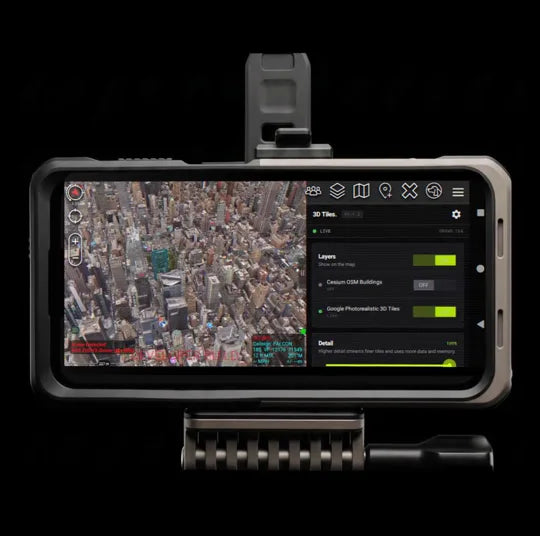
The 3D Tiles ATAK Plugin streams photorealistic 3D cities from Cesium ion onto the ATAK map your team already runs. Tap 3D and the buildings, rooftops and streets of the area come in, sharpening as you zoom. Brief against the real buildings, not a flat image.
Streamed onto the map, sharper the closer you zoom
Add your Cesium ion token.
Enter your Cesium ion access token under Tool Preferences. It is entered on the device and never read from a build file.
Tap 3D on the map.
The 3D widget switches streaming on and off and drags anywhere on screen. Google Photorealistic 3D Tiles and Cesium OSM Buildings stream straight onto the ATAK map.
Coarse first, sharper as you zoom.
A coarse view appears first, with finer detail loading as you zoom. The plugin manages tile memory and reduces detail under GPU pressure to help keep navigation responsive.
Extended feature list
01 SOURCES Google Photorealistic and Cesium OSM Buildings
Streams Google Photorealistic 3D Tiles and Cesium OSM Buildings from Cesium ion straight onto the ATAK map, using your own Cesium ion access token.
02 TOKEN Your token, on the device
The access token is entered in Tool Preferences on the device. It is never read from a build file, so every team uses its own Cesium ion account.
03 RENDERER Custom 3D rendering inside ATAK
The plugin renders 3D tiles directly on the ATAK map through its own OpenGL layer. This gives it control over tile loading, detail selection and GPU memory management, while you keep working in ATAK. It does not rely on ATAK’s built-in 3D Tiles renderer.
04 MEMORY GPU memory kept in check
The renderer tracks tile buffers and textures against a GPU memory budget, frees tiles no longer needed, and reduces detail when the view exceeds that budget. This helps manage dense scenes; performance still depends on the device and the area in view.
05 STABILITY Recovery from tile loading errors
Tile loading and rendering include error handling to skip failed content and recover from supported upload and drawing errors. These safeguards help limit disruption while you navigate the map.
06 CONTROL One tap between 3D and 2D
The on-map 3D widget switches streaming on and off in a single tap and can be dragged anywhere on screen, out of the way of the rest of the map.
07 LICENSE Activate once per device
Activation needs a connection once, and the signed license is then verified on the device. It is bound to that device and can be transferred from the plugin pane.
See it before you are there.
Anywhere your team plans, rehearses or responds, the ground reads in three dimensions on the map it already uses.
PLANNING Brief against the real buildings.
Walk the objective in 3D before anyone steps off. Building heights, rooftops, courtyards and approaches read the way they will on the ground, on the same map the team will run the operation from.
REHEARSAL Walk the route before you drive it.
Rehearse the approach block by block. Zoom in and the streets, corners and entrances along the route sharpen, so the team knows what it is looking for before it gets there.
SECURITY See what overlooks the venue.
Look at the rooftops, parking structures and taller buildings around a venue or a route, and plan posts and coverage against the structures that are actually there.
RESPONSE Know the structure before you reach it.
Look at the campus, industrial site or city block a crew is heading into while it is still en route, on the same ATAK map the rest of the incident is running on.
Getting set up
with Cesium ion.
The plugin streams 3D from your own Cesium ion account. Here is how to get a free key and what Cesium's plans allow.
Cesium offers a free Community account, and it takes a few minutes:
1. Sign up at ion.cesium.com/signup with an email address or a Google or GitHub account.
2. In Cesium ion, open Asset Depot, find Google Photorealistic 3D Tiles and add it to My Assets. Cesium OSM Buildings is already in every new account.
3. Open Access Tokens at ion.cesium.com/tokens and copy your Default token, or create a new one that can read your assets.
4. In ATAK, go to Settings › Tool Preferences › 3D Tiles, paste the token into Cesium ion access token, then tap the 3D widget on the map.
Cesium's free Community plan is for personal and non-commercial use. If you use the plugin for an agency, a company or other paid work, Cesium requires one of its paid plans, starting with Commercial. See cesium.com pricing for the current plans. Your Cesium account is separate from the plugin license, which you buy from us.
Cesium sets monthly limits on each plan. The Community plan currently includes 15 GB of streaming and 1,000 Google Photorealistic 3D Tiles root-tile loads a month. You can check your usage at any time in your Cesium ion account.
Google Photorealistic 3D Tiles has to be added to your Cesium ion account before your token can use it. In Cesium ion, open Asset Depot, find Google Photorealistic 3D Tiles and add it to My Assets, then switch 3D off and back on in ATAK. Cesium OSM Buildings works with any new account.
Only on your device, in the plugin's settings in ATAK. It is never built into the plugin, and each person or team uses their own Cesium ion account.
A lifetime license for the 3D Tiles ATAK Plugin on one device, delivered by email. Activation needs a connection once. Deploying to a team? Email sales@getgotak.com for volume pricing.
READY TO FIELD IT
Stop briefing on a flat map.
License the plugin in under 2 minutes, add your Cesium ion token, and the city is on your map. Deploying to a team of 10+? Book a scoping call for a volume quote.
- ✓ Ships instant via email
- ✓ $50 lifetime · one per device
- ✓ Fleet pricing available
